Unfortunately the latest iTunes version is missing some Libraries, that are required to connect the iOS device via USB,
Best
Unfortunately the latest iTunes version is missing some Libraries, that are required to connect the iOS device via USB,
Best
MPE is on our list, but not yet implemented. Our first Goal was to recover the old functionality of studiomux. As soon as we have a stable version we will integrate MPE.
Best
pascal
Deal Pascal that s great news ! Waiting eagerly for this !
You know this was the closest for me that felt pretty good - I’ve got to do more hardcore testing but it didn’t die in some weird thing (see video). I’m still getting a bit of distortion in the right channel that makes it unusable (or at least not using that as part of the sound design) but it was receiving midi nicely, returned audio fine and even allowed me to record video from ios – I was actually surprised by this last one, using the pipe to send video signal and I can tell you it was totally distorting before I tried to record video.
Trying to close the popup window doesn’t work though (see vid)
I want to say – and this might be controversial - but having a working, solid, multichannel StudioMux would be … it would be a big thing for me as I’m about to embark on traveling with my family in an RV for a year (don’t ask) and I would treat my ipad as a rack of ourboard gear. I wouldn’t even mind paying for an upgrade to make sure this gets the love it needs. And hopefully MPE at some point 
Hi All,
I’m using Studiomux to have a bidirectional midi connection between my Lemur ipad app and Ableton Live 10. I only need midi, so all audio related problems are not important for me.
On my older Macbook Air running Sierra (10.12.6) i have Studiomux version 3.1 server and this works with the Studiomux app (latest version on App store) on my old ipad (IOS 9.3.5). Stable midi connection between Lemur on the ipad and Ableton 10.
On my Windows 10 computer i installed the latest server Studiomux 5 version i found here and after downgrading Itunes it worked fine with that same old ipad. So again a stable midi connection between Lemur and Ableton 10.
On my newer Macbook Air running Big Sur (11.1) i am trying all the different server Studiomux 5 versions in this thread and none of them give me a midi connection with the ipad. I am wondering if i am doing something wrong or that it is simply a Big Sur issue? Does anyone here have a working bidirectional midi connection between ipad and Big Sur application using Studiomux 5? Maybe it is because i have a older ipad, but this is working on Windows 10 and Studiomux 5 so i guess that this is not the problem?
Hello,
New user here. I was about to buy Studiomux until I read it wasn’t working on iOS 14 anymore and then I discovered there was a new Studiomux in beta stage.
It’s quite straight forward to use but sadly, it “doesn’t seem” to work for me.
Device
Iphone 11 Pro - ios 14.4.2
Computer
Windows 10 - studiomux 5.044
My iphone is connected throught the lightning cable to my PC and I use Reaper as the DAW.
I’have also a Microkey 25 Air connected throught bluetooth to the iphone.
I setup the studiomux Instrument VST3 in the FX slot of a track in Reaper (not the IN FX slot) and it finds the iphone. The output in the studiomux app finds the server (funny name :)) as well and the channel shows up too (channel 1).
I then put a synth app as a IAA because I want to record audio (Audiokit Synth One), in the input slot of the channel 1 and I hear sounds coming out of my phone when I press the keys of my MIDI Keyboard.
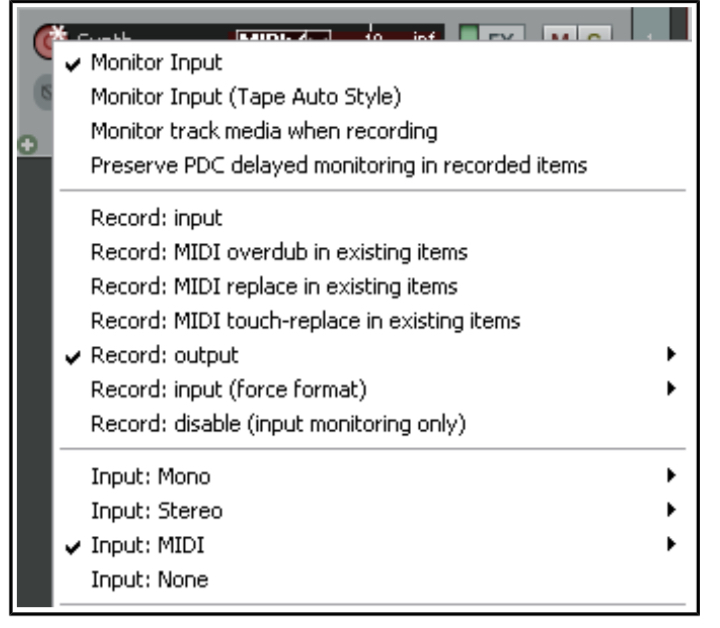
The issue is … I couldn’t have Reaper to record any sound. I setup the input of the track as Record Output:stereo, but Reaper keep recording my microphone, which is the default recording device in Reaper’s Devices setting.
Is there something I’m doing wrong or is it that Studiomux isn’t there yet on Win 10 ?
Hi,
is there any way to create a MIDI or Instrument track in reaper and load the instrument into that track?
Best
Pascal
Beta report (latest server – 5044 on latest Big Sur):
Smux kind of works OK with iPhone 7+ (iOS 14.4.2). Occasionally fails (user error?) But significant latency is introduced when using it on the iPad Pro 10.5 (iOS 14.4.2) with identical audio settings. Also, plugin occasionally makes weird clicks and audio spikes when selecting the device within the VST3 plugin inside Live 11. sometimes this locks up the VU meters on audio channels.
It is still necessary to manually deselect 44.1kHz and 512 samples in the iOS apps as both settings have two values selected. (I use 48kHz and 128 sample buffer)
Smux audio device still doesn’t work at all.
EDIT
Ok, I got it working with Mixcraft (Damn I love this DAW), but I had to use a Virtual Cable to route the output of the MIDI track where I plug Studiomux Instrument (Mixcraft has no feature to record the output of a MIDI Plugin realtime). Then I output the MIDI track to an Output Bus which itself output to the Virutal Cable. Then I create an Audio Track with this Virtual Cable as Input, arm the track and press record.
Best surprise : No Latency at all.
I was afraid the Virtual Cable add some and it didn’t. Recording was on tempo.
Except for some crash of the StudioMux app when I wanted to swap an input App for another (or Geoshred crashing it in IAA mode), everything was rocksolid.
Take my money (even if it’s the beta) 
And about Reaper ? Well. No success … Yet 
— originale answer —
Nope. There’s only one type of track which can handle Both Midi or Audio. It depends on what type of input you select.
Inalso tried with another DAW, Mixcraft, where I could create a regular Midi track, but it didn’t work either.
I tested the latest version in 3 computers and 2 iPads but no luck here 
With sample rate at 44000 I got no sound. With 48000 or 96000, REAPER auto-mutes the track because the input is too loud.
I am curious about one thing. Why the Sample Rate is 44000 instead of 44100?
iPad Pro 2016 & iPad 2018
iOS 14.4.2
App Studiomux 5.051 (2383)
Windows 10 Pro (1909) & (20H2)
Studiomux Server 5.051 Beta - 2021-04-01
DAW REAPER (x64) 6.26
Apple Drivers installed from Pascal’s ZIP file
Apple Application Support (32 bits) 8.5
Apple Application Support (64 bits) 8.5
Apple Mobile Device Support 13.5.1.2
Bonjour 3.1.0.1
Hey,
sorry for the long wait. After testing on multiple hosts on win, we may have found the issues regarding the silent audio out- and input and reworked the VSTs.
These should now operate properly with different audioformats:
For those who are interested we also built the first set of VST2s:
win:
mac:
Best
Edit: unfortunately i introduced an issue on mac. please make sure to send audio to the plugin, before selecting a channel, will fix that soon;
Hey there, Pascal.
Thanks a lot for your work on this!
Unfortunately, I’m one of the guys who don’t get Studiomux to work.
Here’s my configuration:
iPad Air 2
iOS 14.4.2
Studiomux App 5.051
Windows 10 Pro 20H2
Build 19042
Studiomux Server 5.054
Cubase 11.0.10
iTunes version 12.10.8.5
Basically, the app shows up fine on iPad, but the server application on Windows won’t work: when I launch it, the icon just disappears as I pass on it with the mouse. I tried run it with admin rights, same thing.
Any help?
Thank you so much!!!
Not Pascal here, just a fellow user, but this sounds like an iTunes issue to me. Try uninstalling all iTunes elements using this guide and then re-installing 12.10.8.5
Thank you! I’ll try it asap👍
Hi Pascal
Can you please post studiomux 5 ipad app beta that we can somehow install directly to our ipad? IO cant use the fairlight app as my ios is at 12. I want to be part of this beta test to make sure it works well going forward but how can I?
If I cant be a part of beta testing, please you others that can please make sure this things works well and is easy to use including midi setup to and from. This thing should be plug and play
Hi,
unfortunately it is not possible, to test without test flight.
I will try to fix the remaining issues in the next weeks and include the features, that have been part of the previous studiomux version. Once it works for everyone in the forum, i will release the App for iOS14 users first and later, when tested for iOS13 and earlier.
Best
@iso
All good now, thanks for your help!
On the iPad, it seems it’s impossible to have IAA instruments work: as soon as I drag one of them (Animoog) into a channel, the app crashes…any ideas?
Try a soft re-set of your iPad…hold the off & home buttons down simultaneously until the apple logo appears then let go of both, wait a few seconds then re-boot the iPad. This often resolves IAA problems. Animoog IAA & Smux working fine on my Air 3.
If this doesn’t work , you could try uninstalling & reinstalling the Beta app, but this will also mean that you will have to do the Test Flight request again. If this is your only Test Flight app it will also mean reinstalling Test Flight app again…it’s a bit of a pain…! ( & may not solve anything )
Good to hear the server is now working…cheers…
thanks man, I’ve actually tried all of this, nothing helped unfortunately…Would I fix this if I get back to a previous version of the app?