What happens if the iPad isn’t connected to the PC?
I’ve actually tried with the iPad not being connected to the pc… But I could try with the iPad connected emy MacBook, who knows… I’ll try and let you guys know 
In case the app is crashing again, can you send us a crash log via testflight mentioning your nick name, thx.
I will go through all receive app crashbug today, maybe this will already resolve the issue.
Best
Pascal
I think I’ve already sent the feedback, but I’ll do it once again as you suggested, thanks a lot Pascal!
1 Like
hey @Pascal, just wanted to let you know that I sent the feedback just now.
Later!
Hi,
thanks a lot, we could not find the source of the issue exactly, but at leaset narrow it down. We will upload an update this night or in the course of the next day.
Best
Pascal
I want to add to some of my previous comments.
I’m a simple guy and all I ever wanted was to be able to use Animoog/Moog Model D via Studiomux.
My go-to test app every time I load a new beta of Studiomux on my iPad Pro is Animoog for iPad. But this is a problem as this app alone introduces maybe 200ms of latency…I’m guessing the number but there’s a noticeable lag after executing a note. Bear in mind, this does not usually happen on iPhone 7+.
Today I started testing various AU synths and the latency is right down in the playable range. Excellent!
So I tried the iPhone version of Animoog on iPad and it also lags. Reset iPad; Still lags.
I’m not sure why but this app doesn’t jive with SMUX on the iPad only. Any thoughts?
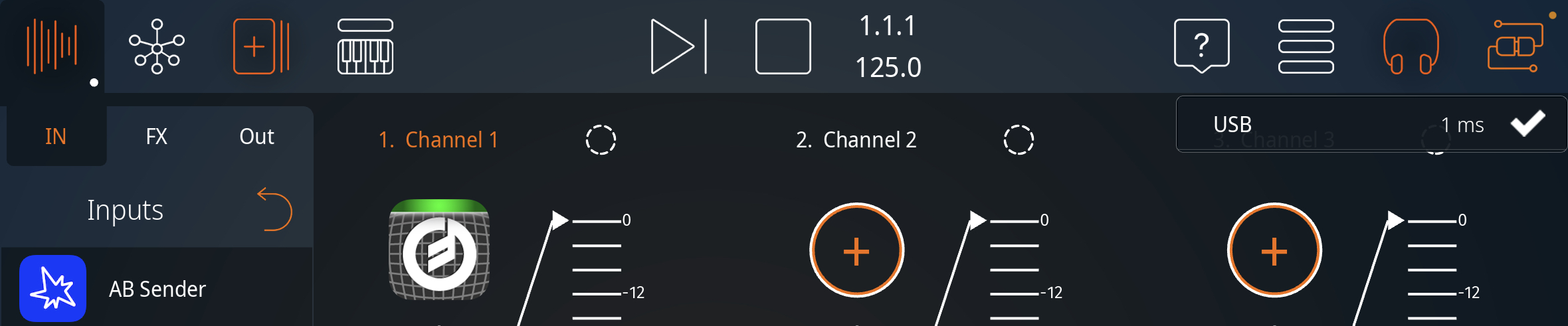
Hey Vault - I’m using iPad Air (4th Gen). Read your post and decided to give Animoog a try. I’m getting 1ms latency over USB, sometimes 2ms. I’m using 128 buffer and 48kHz. My iPad is connected to a Hub, which is downstream from another Hub, which is then hosted by my Mac mini, using Hosting AU w/ the Smux Instrument loaded on the Track D/Ext In. Audio is played out from Hosting AU to my mixer, then out to my monitors (what you hear in the video, along with the tv in the background :)). I disable the wi-fi in Smux as well.
1 Like
After the new release on testflight, I can load IAA with no problems. I tried just Animoog btw, and it works fine. There’s a little latency added, but as @Aud-iOS said, it’s about 1 or 2 ms overall, with buffer at 128 samples, sample rate at 48kHz. oh, and once again I’m on an Air 2.
Weird thing: I’m able to use any keyboard or controller connected to Cubase for controlling IAA/AU instruments, every CC works, but pitch and mod wheels don’t…strange!
1 Like
Hey responders, that 1-2ms reading is probably not the audio latency. I’m guessing it represents some data latency for transmission over USB. The figures are not realistic for audio. I’m glad it’s working for you guys but I’m also at 48kHz at a 128 sample buffer (both in SMUX and in the Animoog apps) and its unplayable. I’m using the VST3 plugin in Ableton LIve 11.0.2. (MacOS 11.2.3) All the other synths I’ve tested work super smoothly — only Animoog is skunking out.
I’m guessing then it’s an issue with the particular iPad model. I’ll try with that model when I get a chance this evening. Yes, the latency report there of 1-2ms is likely just the latent latency from the USB connection. However, I can’t detect a shred of latency from when playing the app - that’s what I tried to show in the video. For me this new version of Smux has greatly decreased audio latency across all the apps.
1 Like
Its a 2017 iPad Pro 10.5".
It’s kind of useless…the USB ports on the MacBook pro flip back and forth between on/of charge states 50% of the time unless it’s precharged to 100% (an Apple hardware/software issue). I guess I should stick to iPhone since it works.
@Pascal
Just to be sure :
It is not yet possible to send and record midi note in my PC Daw when I play on the app on my iPad, right ?
I have to plug my Keyboard to my computer in order to control the app I setup as input if I want to record midi.
Hi Manukineko,
this is the first thing I always try with each new version and I see the same: no Midi from iPad to the computer.
And @Pascal – audio from computer/effects plugin to iPad/studiomux app:
works fine when inserting IAA effects in the FX slot. But how do I get audio from studiomux into AUM? As AUM is also a host, it certainly cannot be inserted in the FX slot. Will you add IAA instruments to the Outputs (like it is in Inputs)?
In AUM I can select a studiomux channel as an input source, but as in studiomux there is nothing assigned to the output, there is no audio, of course.
1 Like
@Josef This is also my number one desire / request, to be able to route audio from SMUX to AUM (or Audiobus), as you could in the old Studiomux. @Pascal is that something that is coming?
1 Like
Hi,
just a small update, we are currently working on the midi side of the app. As you already notice the App to Desktop midi transmission is not working properly. Actually midi data is sent, but due to timing issues the midi ports on desktop side cannot properly process the midi data.
This is correct, but it will be :). Hopefully within the next update.
Will work on that next. Should also be done within the next update.
I already started testing MPE a bit, but haven’t dived into it very deep. As i understand the MPE architecture correctly, all we have to from our side is to allow the transmission of MPE is to disable some (Aftertouch/Channel Pressure/etc.) of the filters in MIDI data receiver. This should also fix your issue with pitch and mod wheels @andreacomposer.
We will hopefully release a new update at the end of the week.
Best
Pascal
3 Likes
great, looking forward to it!
Good news indeed, thanks @Pascal.
Hi all,
I’ve been following the thread for a little while. I became interested in studiomux when I learned you could potentially send two way OSC over usb. I don’t really see any chatter about that here. Anybody care to chime in about that?
I tried to get up and running but failed I think in part due to my iTunes version. Haven’t had time to dive back in so I figured I’d try the community here. Thanks Pascal for your hard work!
Hi,
i tried to fixed all MIDI related in the latest update. The OSC part has been roughly implemented, but is not usable in its current state. I will work on that topic and let you know once finished. Will try to get it done today.
Best
1 Like