Yeah as I mentioned before the scan displays the VST names at the end of the scan. The files are there and Live is indeed looking in the correct folder.
@coido Sorry for the delay, but here are the screen shots of AUM sending audio successfully to Ableton Live. There is audio coming back to Studiomux, but I’ve not managed to pass it on back to AUM or Audiobus yet. Just tried today with the new beta and Audio Unit hosting in SMUX now seems to be working (I tried with Flynth).
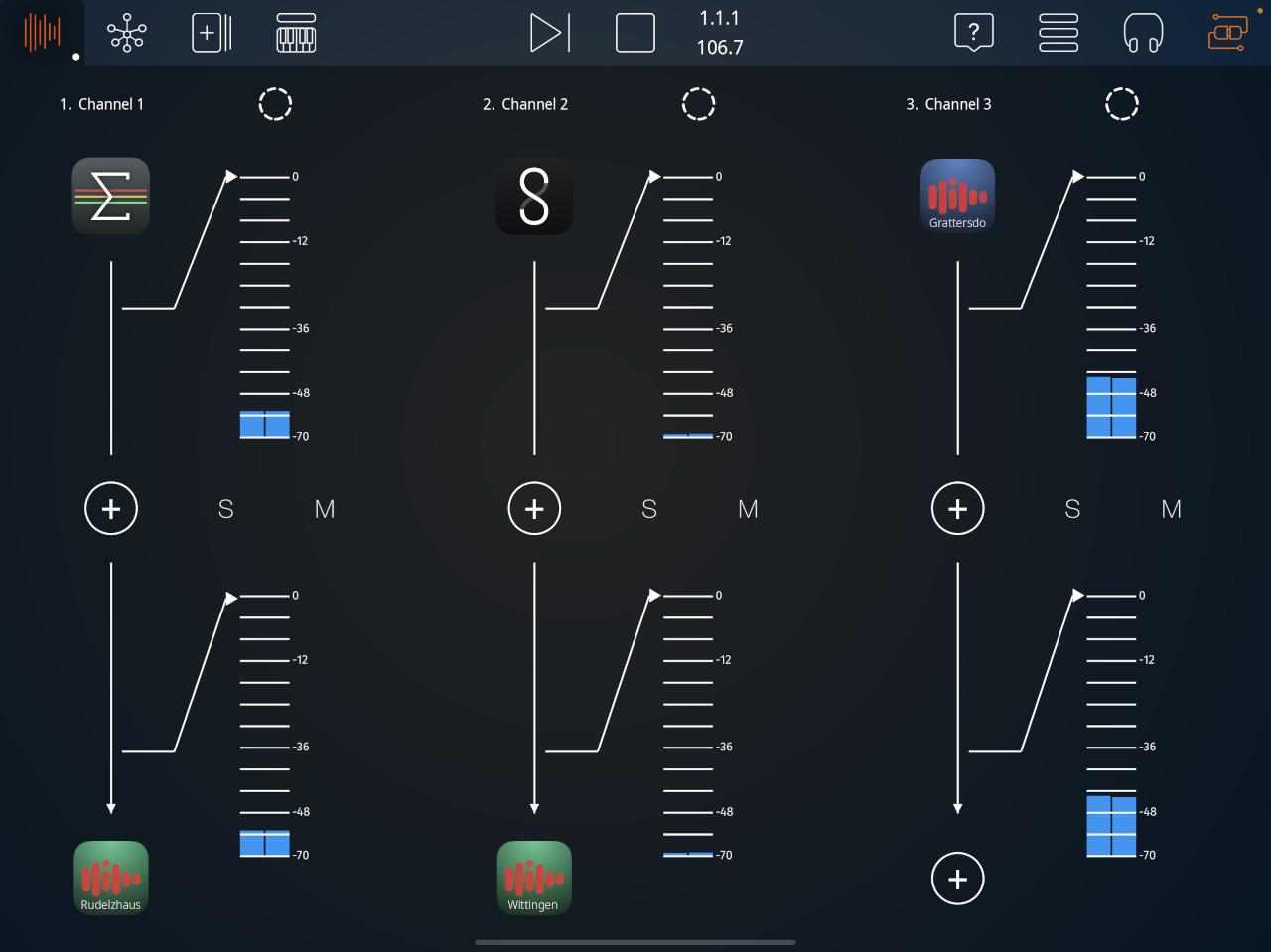
@coido And here is the AUM session:
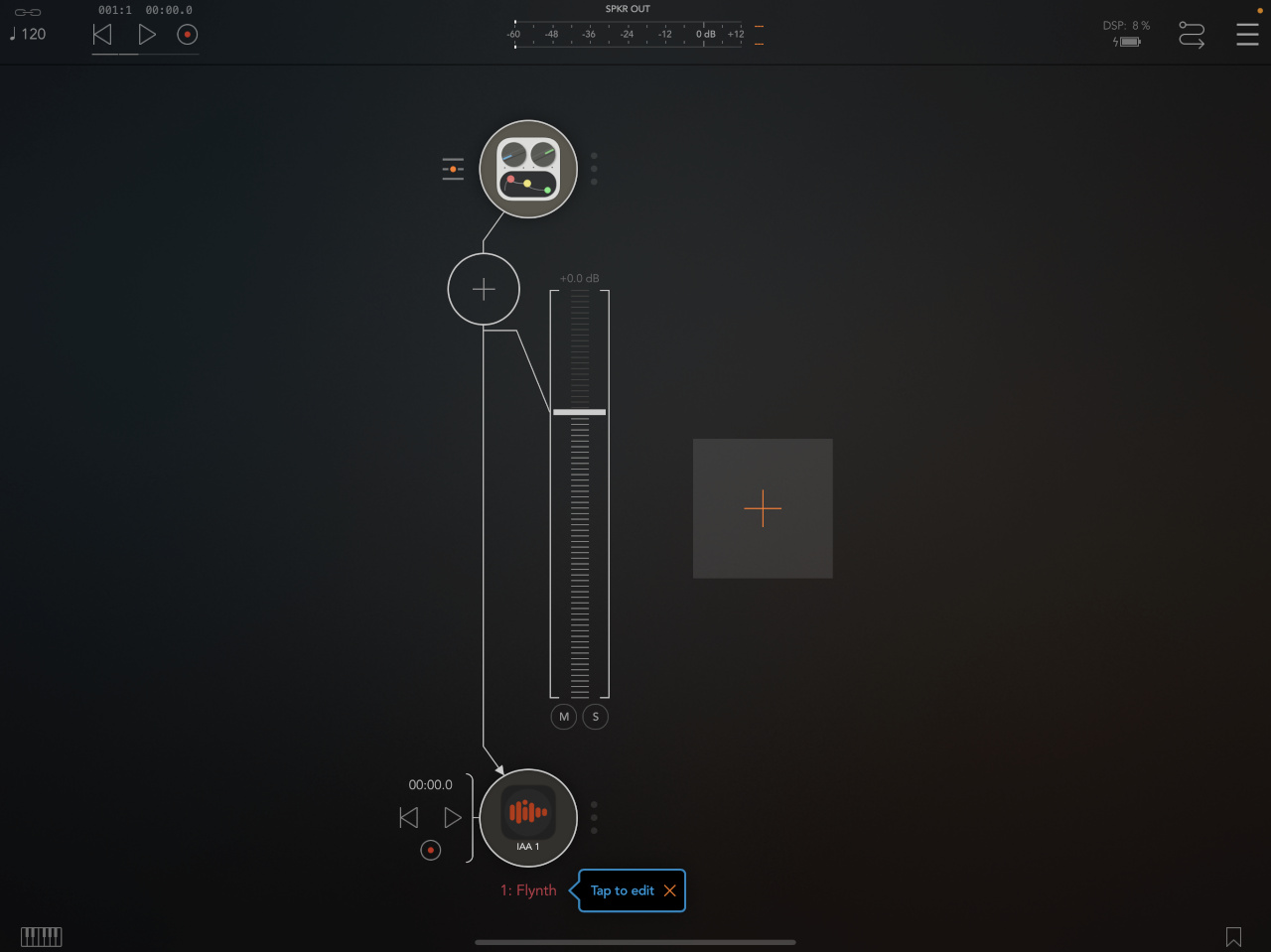
DCJ,
Whenever I have had problems with VST3s (not that often these days thankfully) I have found this helps:
- remove the VST3 files;
- turn of VST3 use in Live’s settings;
- turn it back on and let it rescan and create its database;
- reinstall the VST3s.
- It should auto rescan at startup then and find the new VST3 files.
Usually, this solves any issues.
Update:
I got Studiomux working smoothly on the iPhone 7+ in Live 10 (macOS 10.15.7) last night after the big macOS system crash.
Next, iPad Pro 10.5". It also worked well and I think the sample rate issue has been solved.
I tested both generator and instrument plugins with mostly no issues. Some IAA/AUv3 FX seem to kill audio/or simply not load but further investigation is required and I’m not in an optimal testing environment this week. I haven’t been submitting iOS testflight crash reports (I had maybe 3 or 4 SMUX crash events last night) due to remote internet connection issues. Anyway, seems pretty stable compared to previous beta versions. Nice one, Pascal! 
Thank you for this! Unfortunately, they still do not show up. The scan does show studiomux_plugin_effect at the end though.
Out of curiosity, how do they show up for everyone? Are they listed under zerodebug in the VST3 section? Is the name the same as the file name?
Ugh it seems like most of my problems then are being on OS X 11
That’s awesome, thank you for taking the time to take the screenshots, unfortunately, it does not work on my setup.
- AUM can not be loaded as the input in SMUX, and SMUX is not available as the output.
- no SMUX audio output or input detected in OSX at all, just the iPad.
- no VST detected by Ableton or Cubase.
My setup: iPad Pro 12.9 1st Gen, iOS 14.3, OSX Catalina 10.15.6 and SMUX server 5.025.
hello !
does studiomux beta work with osx mojave?
salut
This server build (latest windows beta from website)isn’t installing the vst3’s properly, however they are in the Zerodebug folder. You will need to manually copy them from there into your vst3 folder that Ableton (or other DAW) can see.
Hopefully this will be fixed in the next build.
They show up in a folder named ‘Zerodebug’ in Live 10 (macOS 10.15.7).
I organize VST3s via my own folder system where the installer doesn’t make one so I can more easily find VSTs when loading through certain hosts that don’t expose the folder name in the UI – unless they don’t do so automatically. This occasionally causes problems.
Filename is the same IIRC.
@coido Outputs from AUM should be available in SMUX under IAA inputs. Once you’ve selected it as an input then the corresponding output should appear in AUM. It sounds like the VST bit is your problem, you won’t see audio input/output in OSX until the server is running and the VST is active in your host. When I installed the latest server today it updated the VSTs no problem.
Further update from my end is things appear to be coming along nicely in latest beta (OSX server 5.025 on Catalina, iOS 14.3). I’ve got an AUv3 and AUM both sending audio to Live as SMUX instruments, also a SMUX FX sending audio to iPAD, through an FX app and back to Live.
Main problem I’m having is midi routing doesn’t seem to be working, I can see a response in the SMUX midi screen, but no joy in passing midi to apps, either internally or from Live. The built in keyboard is working though. Previously I could see midi activity in AUM from my desktop keyboard in AUM when SMUX was running, but that doesn’t appear to be happening (maybe I need to restart all the players?). @Vaultnaemsae I’ve enabled SMUX midi out in Live, how are you setting up your midi send track or do you think this just isn’t functional at the moment?
@steve99 I re-installed the server and the vst’s on the MacBook, and it is now working! I could get the MIDI to work but only via IDAM by selecting iPad as the MIDI source in Ableton. Under the MIDI setup screen in the SMUX app, the Remote half is blank, so it does not even see the MacBook, even though the Aggregated Device is setup already.
Another funny thing is that AUM (Port 1) does not seem to work in the app, while the other ports do, that was the reason I couldn’t drag and drop it before, as I kept using Port 1, once I switched to another port, it all worked.
Thanks,
cozi
Hi,
I am also interested in compatibility with Mojave.
The server seems to work in Mojave, but not the VST3 plugins. Actually I would need AU plugins for Logic, but I read, that you are planning it anyway. In the meantime I could load the VST3s in BluCat’s Patchwork and use this AU.
But unfortunately BC Patchwork refuses the studiomux plugin. BC Patchwork is very friendly to all kinds of plugins, so this means, there is a serious problem.
What I found in all .plist-files:
LSMinimumSystemVersion 10.15
I suppose, it would not help if I change it to 10.14.
Can I ignore that, or is it definitely true, that the minimum system requirement is 10.15?
The only exception I found is in the package content of studiomux app: studiomux/Contents/Info.plist
LSMinimumSystemVersion 10.9
And indeed, the server works.
Another strange thing I found is in studiomux/Contents/Resources/studiomux.plist:
Root/ProgramArguments/Item 0: /Applications/touchAble.app/Contents/MacOS/touchAble
this path does not exist at all.
But I guess, that is something the user does not have to understand.
Finally something, I am pleased to report – studiomux on iPad (iOS 14.3) seems to run without issues in a setup with AUM. Only I cannot seriously test it, because I have no working plugin on Mac OS.
Best, Josef
@coido Good you’re making progress. I’m going to have a go now and see what I can achieve with IDAM midi, but as far as I’m aware you don’t need IDAM at all for Studiomux to work correctly, no aggregate audio device needed. In fact I would imagine that would potentially confuse things… anyway I may be wrong, will soon find out
Interesting about your AUM port discovery, I think I was ok with port 1, will go check. What does intrigue me is you say you got Audiobus working with Studiomux, I’ve had no joy with that. My ‘AB Sender’ is showing up with a Synthmaster icon, so something definitely not right there… Just been listening to a radio programme about Ancient Greeks learning human anatomy through dissection - sometimes this feels a bit like that, just without the blood.
Yesterday I had ‘remote’ midi devices from my desktop showing up in Studiomux, not today, but they weren’t working anyway so not too much lost there. I’ve just successfully routed midi from Live though (following @Vaultnaemsae advice to add a midi sender strip as well as the VST instrument channel). Screenshot attached. In the Live ‘MIDI to’ box on y Channel 2 I’ve selected ‘Studiomux’, though I can also send to ‘AUM’. I can then select ‘Studiomux’ or ‘AUM’ as virtual inputs in AUM to control my hosted plugins. The midi input on the VST channel 3 doesn’t need to be ‘studiomux’ (it’s not doing anything), that’s just a remnant from my experiments.
SWAM brass betas are working nicely, although can’t route MPE midi out from Live, so connecting my Seaboard Block to iPad over bluetooth, which is then also showing but apparently not working as an available midi input in Live. So long as I can route midi in AUM this is definitely becoming a useable setup.
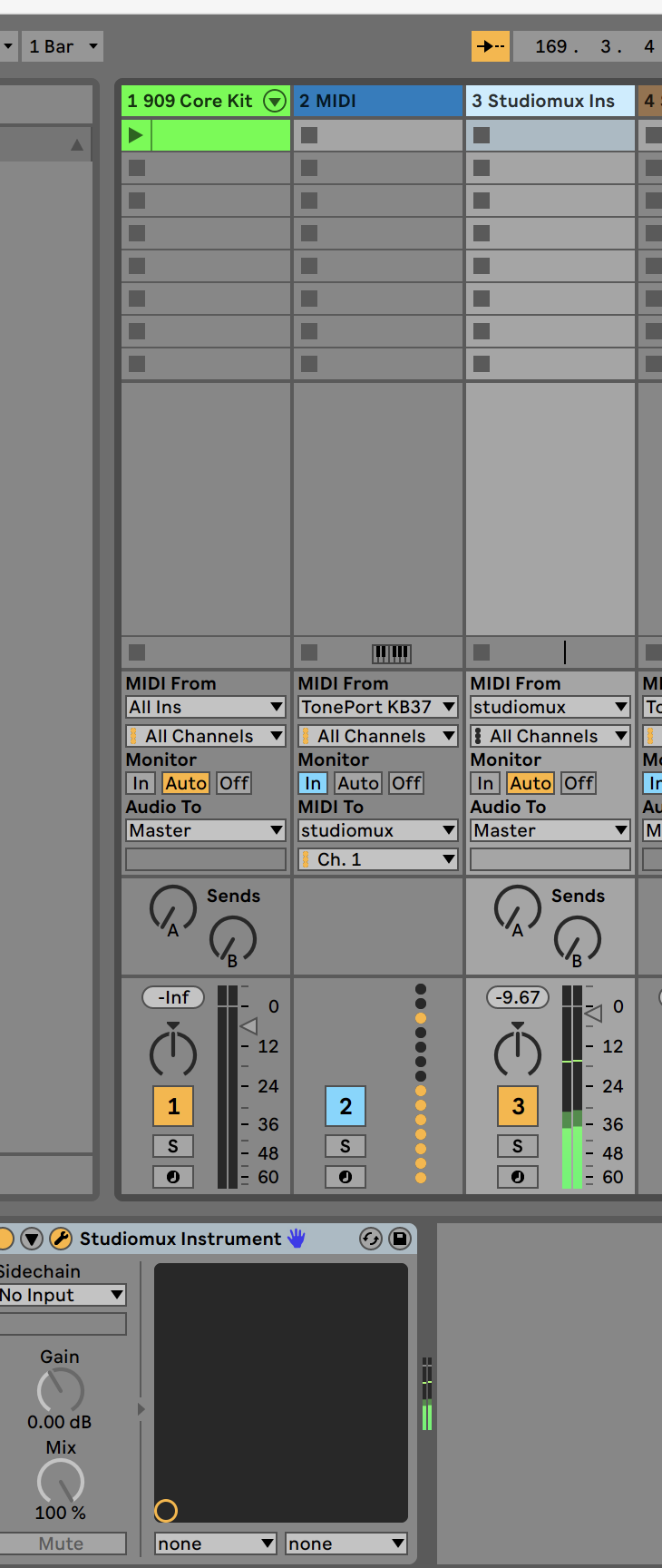
@coido I can select AUM port 1 as an input here, I do it by dragging from the ‘inputs’ screen before opening up the drop down with the 8 different channels on. Then I tap on that in the slot to open AUM and set its output to the IAA Studiomux output. Sounds like it might not be the same for you though?
@Pascal What I’d really like to do is to pass audio from Live via the VST effect and Studiomux app to AUM so I can sample Live’s audio in various apps there (and then send it back from AUM via a Studiomux VST instrument). At the moment I can’t get any audio to go out of Studiomux into either Audiobus or AUM, is this something you are planning to make possible? I can use some FX apps in the Studiomux channel as intended to process audio, but not the ones that allow me to record incoming audio, slice and play as midi instruments like Segments. Thank you, I’m sure this is going to be amazing.
@steve99 WRT to AUM, yes, your suggestion to drag the whole AUM input ports to the channel worked. I am going to try to get the MIDI routing to work today, when you had it working, what was shown in the MIDI screen on SMUX app? Was there an icon for Ableton or the Mac on the Remote half?
I had nothing ‘remote’ showing in Studiomux’s midi page and I’ve not been able to route anything other than Studiomux’s own keyboard in Studiomux itself, BUT the Studiomux virtual input does show up and works in AUM’s midi routing, so you can send it to your chosen app from there.
When previously I did had stuff showing up in ‘remote’ it was the names of the individual controllers / midi ports connected to my desktop, they pulsed when I was pressing keys, but no sound produced unless connected in AUM.
Hi,
thanks for all the feedback. We collected the mentioned issues and will get back with an update soon.
Regarding the VST3 detection issue in mac: We created new VSTs and set the minimum OS version to 10.11, hope that helps. Unfortunately this value got overrwritten during our automatic build.
Best
Pascal