Windows server also fails to install VSTs to common files folder, hence DAW’s unable to see them…
Hi Pascal,
fantastic, thank you very much! VST3 works now in Mojave.
I am very excited about studiomux 5, it’s going to be a great app, good luck for the progress!
Best, Josef
The windows beta for 5.026 links to the 5.025 beta. Also, atm is it not recognizing devices?
Everything working here on iOS 14.3 and iPad 2020 Pro (server, usb and also wifi, itunes, testflight app). The only thing that seems strange is midi. Studiomux 5 beta app does not show remote midi ports. The previous server Studiomix 4 did show in context menu, but app does not load on iOS. Hence only beta works for now (on Windows 10).
@steve99 Despite multiple attempts, I was not able to replicate your MIDI setup in Ableton - selecting “studiomux” as the MIDI output destination didn’t work, while “iPad” still worked as I mentioned earlier.
Going the other way from the iPad to Ableton was oddly different. I could select either “Quantum”, which was used to sequence Ableton’s instrument or “IDAM Host Port” to make it work, but selecting neither “studiomux” nor “iPad“ as the MIDI source would work.
For the above results, I didn’t have an Aggregated Device running as you suggested earlier. Do I need to do something different to get the “studiomux” MIDI ports to work?
Studiomux server 5.025 x64 keeps crashing on windows 10 pro 20H2 build 19042.685. Not even opening. Anyone else have this issue?
HI on the next version of studiomux will there be a display showing remaining battery charge?
bonjour, je souhaite moi aussi avoir la nouvelle version de studiomux sur ipad en beta test. quelle est la procedure a suivre? MERCI
@coido In Ableton make sure you have the Studiomux midi out activated (see pic).
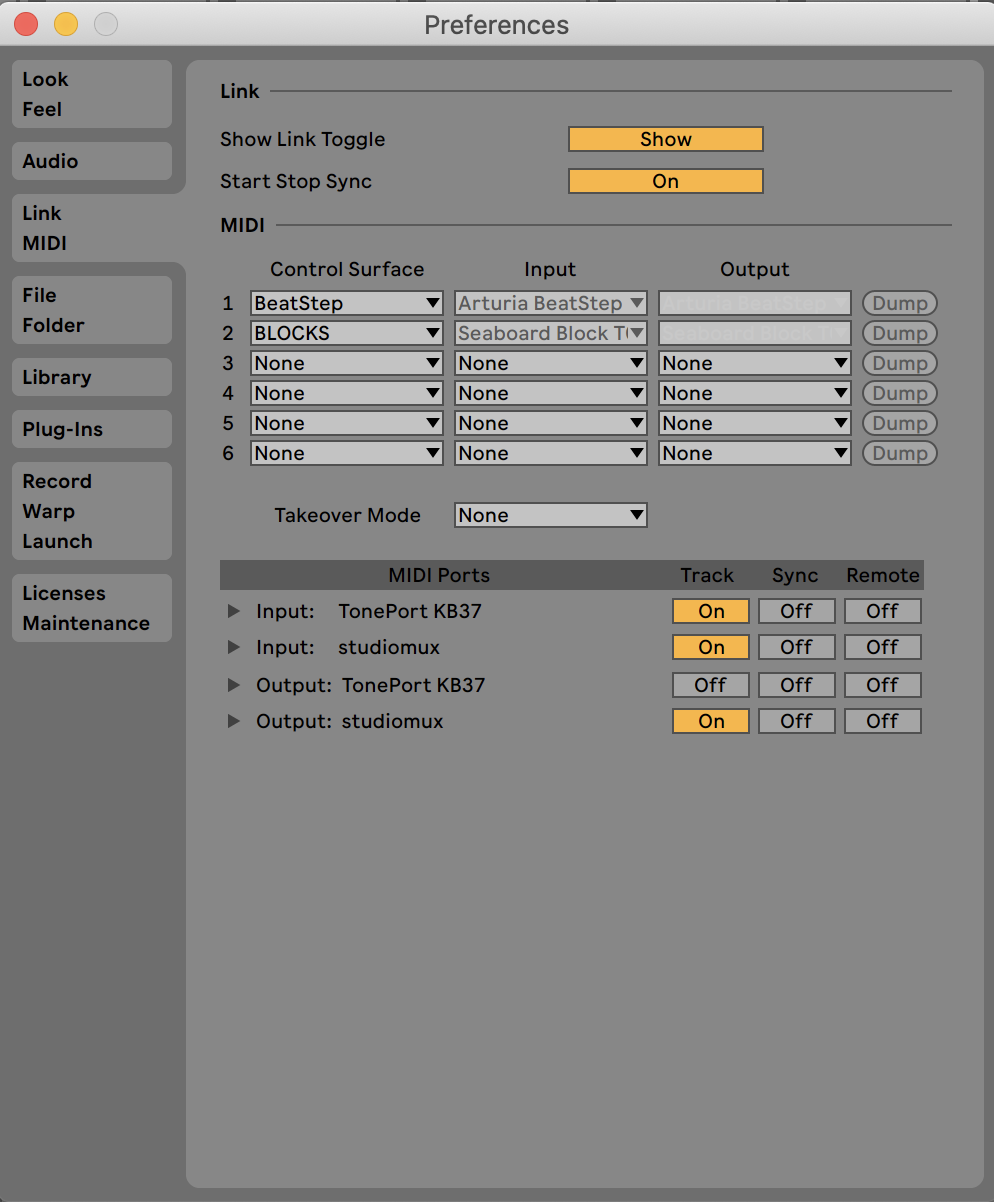
@coido I would avoid IDAM altogether when using Studiomux. I don’t think it causes an actual problem, but you don’t need it (you don’t need to ‘enable’ the iPad) and it creates potential for confusion.
Here is my AUM midi router - are you seeing ‘Studiomux’ in there?
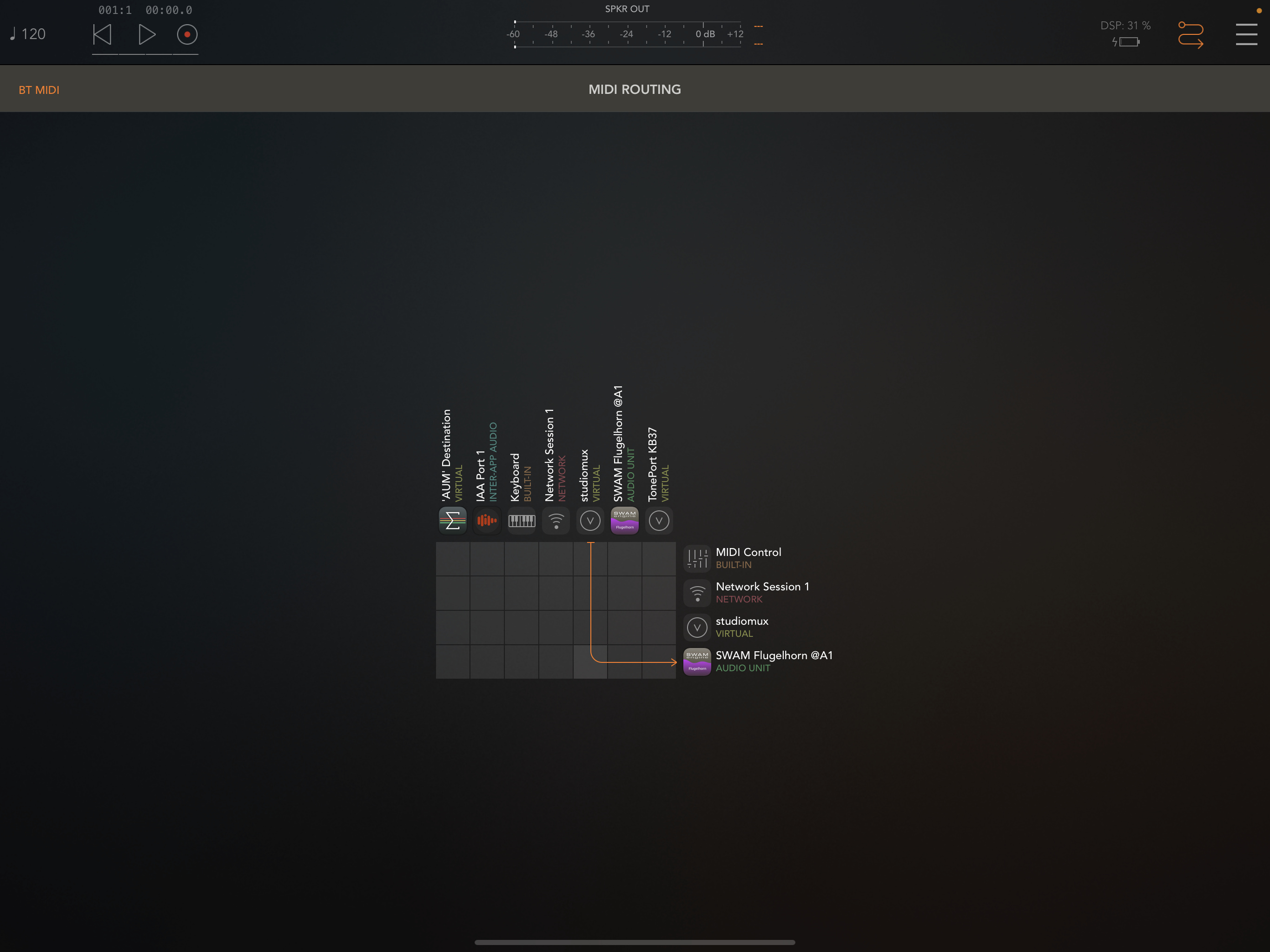
@steve99 Got it! Let me try again. Thanks again for your suggestions.
Update: I rebooted both the server and the app, and now “studiomux” MIDI ports are working as they should. Quite happy with how SMUX is working ATM.
Are you able to route midi from Ableton to studiomux iPad, have some midi arp (StepPolyArp) and send midi back? I am interested in midi only.
Hi,
during copying the VSTs there should pop up a CMD terminal, asking for permissions, do you get to this point of installation?
will be fixed with this server. midi should now run fine on mac and win.
https://zerodebug.com/server/studiomux_5.026.exe
https://zerodebug.com/server/studiomux_5.026.dmg
best
Hi Pascal, yes it gets that far, but only writes about two lines of text (code?), & has to be manually closed. Looks like it isn’t finishing the process…earlier builds had much more text at this point of the install. A pop-up reports that VST3’s have been installed, but are actually only in the Zerodebug file, & not in the Common Files folder. I could screen capture the whole process for you if that would be helpful…
Cheers…
Don’t worry, 5.026 fixed it…
Looks like 5.026 is a step backwards again regarding audio in Ableton 10. Stodiomux instrument vst3 instantly causes the audio to overload really badly as soon as the device is chosen. Same as the build before last.
BEWARE ALL WINDOWS BETA TESTERS: TURN DOWN YOUR MONITORS BEFORE TESTING.
I am able to run as Vst 3 in cubase11 High Sierra.But audio burst before you choose the device is very dangerous for the ear and the system.
Au plug ins are not detected by Maschine
And I don’t think midi connection works reliable .
AUM connection is not stable
Auv3 interface should be scalable
I would prefer the studiomux 4 midi page lay out and plug in UI(Mac os)
Peace
MIDI seems to be working from the MacBook to the iPad but not the other way around, hopefully it will be sorted soon. The only way I made it work before was to use IDAM, but that is not recommended when using SMUX.
I am trying to send midi from iPad (7th generation running on iOS 14.3) to Windows 10 PC (build 18363.1316).
On right click of Studiomux server in PC, its showing Active Connection 1.
But when I am checking with Midi-OX software in PC I am not getting any midi notes even though I have selected Studiomux as Midi input.
I am using Velocidata Midi app in iPad and it has In port and Outport On status.
What am I doing wrong here? Previous (non-Beta) version was showing incoming midi notes in Midi-OX